Create a Logo With AI: The Practical Guide to Professional Branding in Minutes
Creating a logo with artificial intelligence made easy: tips, tools and examples for professional branding - start your AI logo today.
tl;dr:
- Generative AI tools produce logo drafts in seconds instead of days – ideal for rapid iteration and creative exploration.
- With the right prompts, the results look professional for startups, product lines, or rebrandings.
- Platforms like InnoGPT bundle multiple AI models and evolve rapidly with the market – no vendor lock-in, maximum flexibility.
Picture this concrete scenario: a marketing team needs three logo variants by tomorrow for an important product presentation. The agency is fully booked, budget is tight. In the past: panic. Today: generative AI. Twenty minutes later, 15 drafts are on the table. That's not science fiction – that's everyday work in 2026. This shift democratizes professional logo design: companies can generate, iterate on, and perfect high-quality drafts in minutes, without having to rely on expensive agencies or drawn-out processes.
A whole new era of logo design is dawning
2015: a logo from an agency costs €3,000 and takes two weeks. 2026: an AI delivers 50 variants in 10 minutes. Both scenarios have their place – but the rules of the game have changed fundamentally. Those who still wait today are losing ground.
What used to require thousands of euros and endless review cycles now becomes an agile, creative sprint that often lasts only minutes. Generative AI gives your company the ability to create high-quality drafts in-house, adapt them quickly, and polish them to perfection.
What that means for your branding
This new, dynamic way of working brings benefits that go far beyond simply saving money:
- Incredible speed: Ideas for campaigns, events, or a brand-new product get a face immediately. No more weeks of waiting.
- A creative playground: You can try out dozens of styles and directions without having to commit to a single one too early. That's pure creative freedom.
- Smart budget management: Invest your agency budget where it really counts – in strategic finalization, not in initial ideation.
- Pure agility: You can react at lightning speed to new market opportunities, with the matching visual branding ready to go.
This guide is your hands-on companion in this new world. I'll show you how to use the power of AI specifically for your business, how to create a logo with artificial intelligence, how to translate your ideas into crystal-clear instructions, and how to achieve results that take your branding to the next level.
How generative AI really creates unique logos
When we talk about creating a logo with artificial intelligence, we don't mean some fancied-up clipart collection. The AI isn't trawling databases or copying templates. It composes, combines, and creates. Generative AI tools produce completely new visual content from your text descriptions. It's a real creative act.
The creative process behind text-to-image
At the heart of this technology are impressive text-to-image models whose names you've surely heard: DALL-E 3, the technology behind Midjourney, or open-source alternatives like Stable Diffusion. These models have been trained on billions of image-text pairs, giving them an incredibly deep understanding of visual relationships.
Imagine you enter a prompt like: "Minimalist logo for a coffee roastery, a single coffee bean formed from geometric lines, earthy brown tones, clean white background." What happens behind the scenes is fascinating:
- Decomposition: The AI breaks the sentence down into its core concepts – "minimalist," "coffee bean," "geometric."
- Association: It draws on its learned knowledge of what these concepts look like visually.
- Synthesis: Now the magic begins: it composes an entirely new image that unites all these elements in a fresh, original way.
This process is anything but simple copying; it's an artistic act of interpretation and re-creation. Every time you enter the same prompt, a slightly different, unique result comes out. You're no longer just a passive viewer – you're the director of a creative process.
Concrete use cases that really move your business forward
The idea of creating a logo with artificial intelligence only becomes a tangible tool that solves real problems when it hits day-to-day operations. Let's look at where smart companies are already putting generative AI to profitable use.
Startup stage: first logo without a €5,000 agency budget
Every founder knows the problem: the first logo is a hurdle. Instead of paying €5,000 or more to an agency, you can generate dozens of first-class drafts for a fraction of the cost and invest the money saved into product development or marketing.
Product launch: quickly test variants for different target audiences
Launching a new product line? Create different logo variants in minutes – one modern, one playful, one classic. Test them via A/B tests on landing pages or in social media ads. The data will show you which logo performs best.
Rebranding exploration: explore dozens of directions
Before kicking off an expensive rebranding process, use AI to play through countless stylistic directions. It gives you a much more solid basis for strategic decisions.
Event branding: logo variants for trade shows and campaigns
Need a logo at short notice for a trade show or a Christmas campaign? An AI delivers fitting and visually consistent drafts instantly.
Inspiration for designers: AI as a creative sparring tool
Even for experienced creatives, AI is a fantastic sparring partner. It helps break through creative blocks, tests ideas in no time, and provides a broad base for the human finishing touch. AI doesn't replace brand strategy, but it makes design more democratic and faster. The market for AI logo generators is booming and is forecast to explode, as analyses of the AI logo generator market show.
The art of crafting the perfect AI logo with prompts
The quality of your AI logo depends on one thing: the precision of your instruction, the prompt. With the right know-how, you go from passive viewer to active director.
The mini-masterclass for the perfect prompt
A strong prompt follows a clear structure. When you combine the following building blocks, you get dramatically better results.
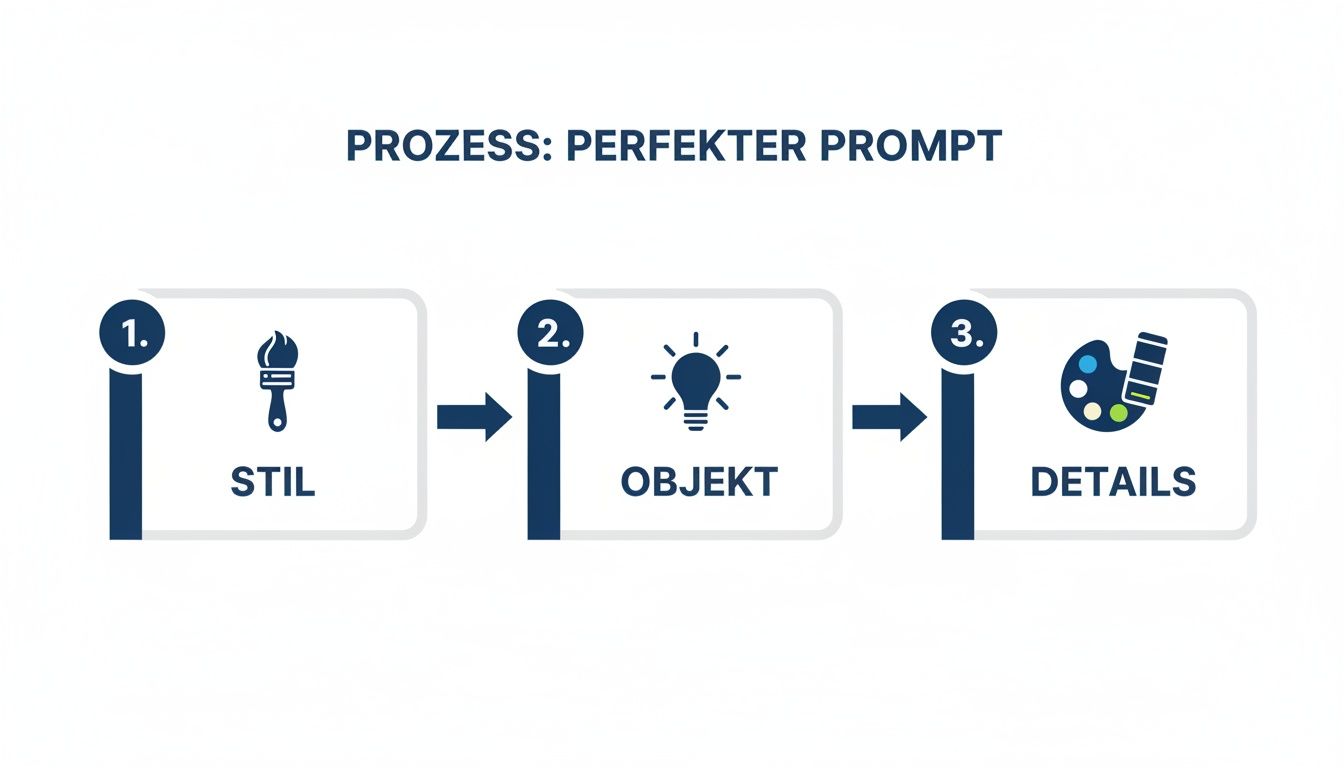
Structure: Style + object + colors + mood + technical details
Example: "Minimalist logo for an AI platform, geometric shapes, deep blue and silver, modern and trustworthy, vector graphic style, white background."
Iteration tips: refining step by step
The first attempt is rarely perfect. The real magic lies in iteration. Think of the process as a dialog:
- Add/remove elements: Your logo feels too plain? Add details: ...with a glowing accent in gold.
- Mix styles: Get creative: minimalist logo in the style of a Japanese woodblock print.
- Request variations: Use the option to generate targeted new variants based on a successful draft.
Common mistakes (and how to avoid them)
- Prompts that are too vague: "Modern logo" is a matter of taste and leads to random results.
- Too many details at once: Don't overwhelm the AI. Start simple and add details step by step.
- Missing stylistic direction: Without style guidance, the AI falls back on generic, interchangeable designs.
If this has really sparked your interest and you want to dive even deeper into the world of perfect AI instructions, you can learn everything about advanced prompt engineering here.
Your workflow from AI draft to finished brand logo
A brilliant AI draft is the starting point, not the finish line. The right workflow combines the speed of the machine with the strategic finesse of a human.
Phase 1: Ideation with AI (10–20 drafts in 10 minutes)
Let the AI off the leash! The goal is not the perfect logo, but tremendous variety. Experiment with styles, motifs, and moods to map out the creative playing field.
Phase 2: Selection and refinement (iterate on the best 3–5 variants)
After the creative fireworks, it's time to focus. Pick out the 3–5 strongest variants and start a dialog with the AI. Sharpen these favorites by adjusting your prompts precisely, moving step by step closer to your dream logo.
Phase 3: Finalization (optional: designer for vectorization, color optimization, trademark registration)
The final step separates the pros from the amateurs: human finalization.
Reality check: AI is brilliant for ideation. But for crisp print files and legal certainty, human expertise is (still) indispensable.
At this point, you should bring a designer or agency on board for:
- Vectorization: The AI draft is converted into an infinitely scalable vector file (SVG, AI, EPS) – a must for everything from a business card to a truck tarp.
- Color optimization: Exact brand colors are defined for web (HEX, RGB) and print (CMYK, Pantone).
- Trademark review: A professional checks whether there are similarities to existing brands to protect you from expensive legal disputes.
This hybrid approach is incredibly efficient. You position AI as an extremely powerful tool that accelerates the design process, without replacing strategic and legal safeguards from experts. According to a DIHK survey, 78 percent of companies are already using AI for images. You can find more details here. If you want to know how to create impressive graphics with AI, we have the right article for you.
Discover InnoGPT: your turbo boost for AI logos
Why settle for one AI model when the market explodes every week? InnoGPT is the smart choice for companies that want to create a logo with artificial intelligence.
Model variety: maximum flexibility instead of vendor lock-in
InnoGPT gives you access to multiple generative image AI models within a single platform. Every model has its strengths – some are better for logos, others for illustrations. You always use the best tool for the task at hand.
Rapid development: always on the pulse of the AI market
The AI market moves fast. InnoGPT integrates new features and models faster than standalone solutions. You're always technologically ahead without having to do inefficient "model hopping."
Avoid shadow IT: a central, professional platform
If companies don't offer a professional solution, employees will use consumer tools anyway – a risk for data security and compliance. InnoGPT is the professional answer: a central, GDPR-compliant platform with EU hosting and a zero-retention policy. You stay in full control. The legal framework is evolving rapidly, as these exciting insights into AI trends also show. InnoGPT offers the legal certainty you need.
Limits and possibilities: an honest assessment
Honesty builds trust. AI makes design more democratic and faster, but it's important to know the real strengths and limitations.
Strengths:
- Speed: Drafts in minutes, not weeks.
- Variety: Endless creative directions to experiment with.
- Cost savings: Deploy agency budgets more strategically.
- Willingness to experiment: Test new ideas without risk.
Limitations:
- Sometimes generic results: Quality depends heavily on the prompt.
- Fine-tuning takes practice: The iterative process requires a willingness to learn.
- Legal aspects: Brand similarity has to be checked by humans.
AI doesn't replace brand strategy consulting, but it's a revolutionary tool that changes the creative process forever.
Try it for yourself: with InnoGPT you get access to the latest generative AI models for logo design – in a platform that keeps pace with the fast-moving AI market. Get started and create your first 10 logo variants today.
Related articles
Create Presentations with AI – Save Time and Wow Your Audience
Create presentations with AI: Discover how AI tools deliver professional drafts in minutes, save you time, and help you wow your audience.
Create AI Presentations: The GDPR-Compliant Path to Pro Slides
Discover how to revolutionize your work with AI presentations in German. Create GDPR-compliant slides in minutes and impress with every slide.
Create PowerPoint Presentations With AI: Your Practical Guide for InnoGPT
Learn how to create AI presentations in English – from idea and structure to finished slides – with our InnoGPT guide.