The Key Takeaways at a Glance:
- Unlimited creativity: Generative AI produces new ideas, texts, structures, and even visual concepts at the push of a button — no proprietary data needed, you can start immediately.
- Massive time savings: From the initial concept to the final design, AI automates tedious steps so you can focus on the strategic core message of your presentation.
- Full data control: With GDPR-compliant AI solutions from Europe, your sensitive company data (financial figures, strategies) stays secure and is never routed to US servers.
Imagine you are the conductor and AI is your orchestra — you set the melody, it delivers the perfect harmony. That's how presentations are born that both touch the heart and convince the mind. This isn't about replacing your creativity — quite the opposite, it's about truly unleashing it!
From First Spark to Finished Outline: AI as Your Creative Partner
Fear of the blank page? A thing of the past! When you decide to create an AI presentation, you jump straight into a creative process. Generative AI specializes in producing entirely new content. You don't need your own datasets — you can start immediately with a simple idea.
Give the AI your topic as a straightforward prompt, for example, "Investor pitch for our new software product." You'll be amazed at how quickly you receive a whole range of different angles and fresh ideas in return. This is no niche topic anymore: According to a Bitkom study, 57% of companies in Germany are already engaging with AI. This shows the enormous productivity boost such tools can deliver. If you want to dive deeper, check out the study on AI adoption in German companies at bitkom.org.
As of June 2026, the field has advanced considerably further: the latest generation of multimodal models can now generate not just text, but directly structured slide content — including layout suggestions, image descriptions, and speaker notes. Anyone creating an AI presentation today benefits from a significantly more mature technology than just a year ago.
Your Structure? Refined at the Push of a Button!
Once the initial ideas are flowing, it's time for the fine-tuning. Now you can give the AI specific instructions to build a logical outline with introduction, main body, and conclusion — tailored precisely to your audience.
A step-by-step example for a project report:
- Input: "Create an outline for a project completion report for Project X. The audience is senior management. Emphasize achieved milestones, budget, and next steps."
- AI Output (suggestion): The AI delivers a complete structure, e.g. 1. Executive Summary, 2. Project Goals vs. Results, 3. Budget Analysis, 4. Lessons Learned, 5. Outlook & Recommendations.
- Fine-tuning: You adjust the outline to your liking and ask the AI to formulate the key message for each point.
This makes it effortlessly easy to build the perfect framework for your content, saving you hours of deliberation.
Content and Designs Created at the Push of a Button
Okay, your outline is ready — the framework is in place. Now let's breathe life into it! With the right generative AI, you conjure content that truly convinces, and a design that perfectly supports your message.
Imagine feeding the AI bullet points for a sales presentation. Instantly — the AI weaves them into a compelling story about the customer value of your product. That alone is an enormous time saver for content creation. But there's more!
Modern tools don't just suggest text — they also recommend suitable icons, royalty-free images, and even complete slide layouts. This is a real game changer, because it means anyone, with zero design knowledge, can achieve impressive results. You get a professional AI presentation that looks like it came from an agency — and it can even match your corporate design.
As of June 2026, tools like Gamma.app, Beautiful.ai, and Canva AI offer extensive AI features directly within their editors. The quality of automatically generated layouts has improved significantly: topic-dependent color palettes, automatic image selection, and consistent typography are now standard. For anyone who needs a quick first draft, these tools provide a strong foundation — but fine-tuning to match your own brand remains in the hands of the user.
Take a look at this infographic. It clearly shows just how much time you save compared to the traditional approach:
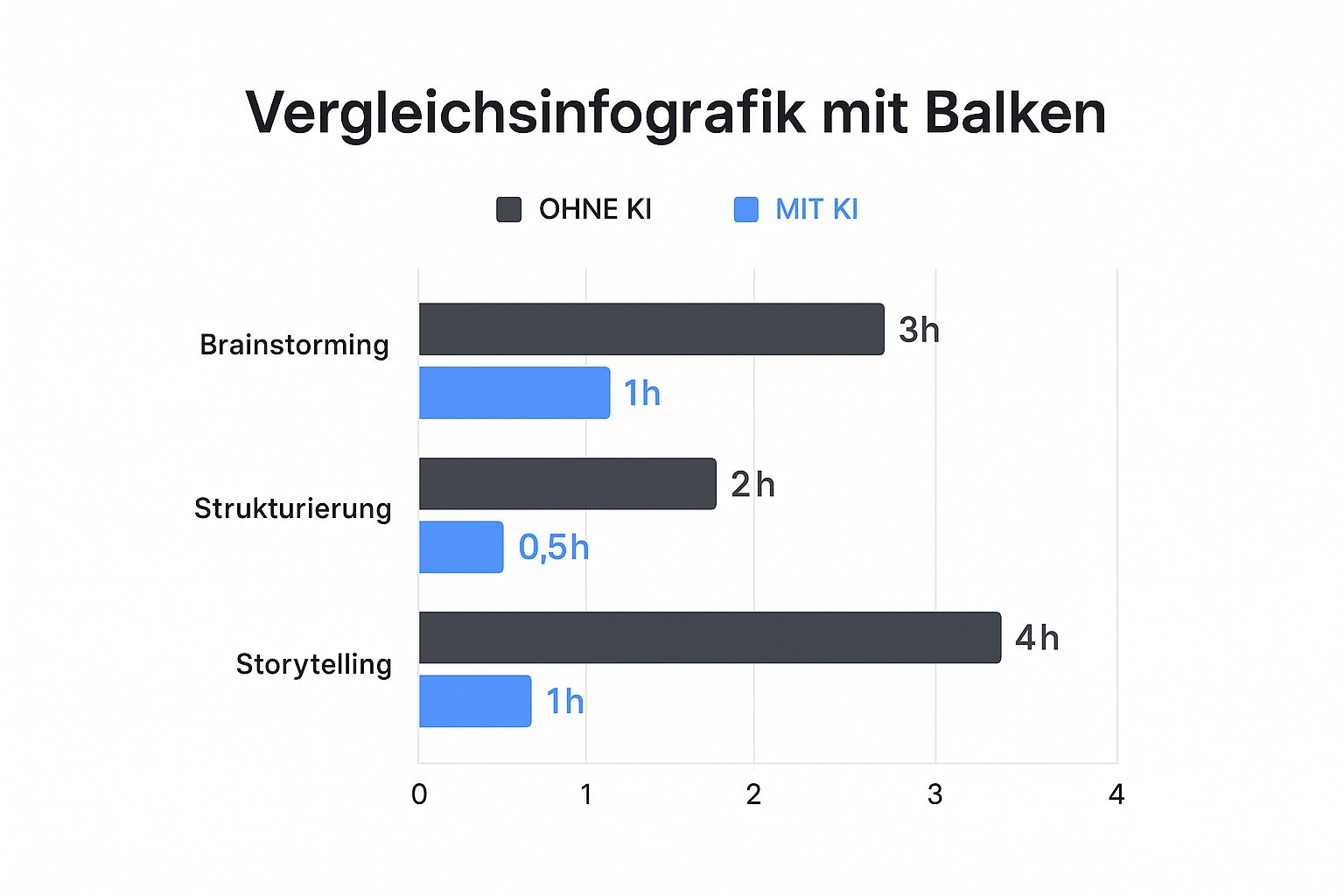
You can see it immediately: the time savings can exceed 70%! This isn't a minor optimization — it's a true game changer that will make your productivity skyrocket.
Practical Use Cases Within the Enterprise
To make this more concrete, here are a few specific examples of how generative AI makes a difference across different departments:
| Use Case | AI Support | Your Benefit |
|---|---|---|
| Sales presentation | Creates a compelling storyline, formulates concise value propositions, and suggests suitable graphics. | You can focus fully on the customer relationship while AI prepares the perfect pitch. |
| Project report | Summarizes complex status updates into understandable bullet points and visualizes KPIs in clear charts. | You deliver all decision-relevant information to management quickly and precisely. |
| Training materials | Transforms dry manuals into engaging, didactically structured learning modules with examples and visuals. | Your employees learn more effectively and you save enormous effort in creating the materials. |
| Investor pitch | Develops a compelling outline from problem to solution and finds strong visuals that reinforce your vision. | You leave a professional and memorable impression on potential investors. |
For pure content creation and optimizing your entire workflow, modern AI tools are simply invaluable. When text and design work together this seamlessly, it takes the quality of your presentation to a whole new level.
Team Success: How AI Takes Your Collaboration to the Next Level

Let's be honest: presentations are almost never a one-man show. Most of the time, it's a team effort. And that's precisely where generative AI becomes an absolute game changer! Imagine a central platform where your entire team can simultaneously work on an AI presentation. It changes everything.
The days of wading through endless email chains with different versions are over. Now everyone can contribute ideas directly in the tool, collaborate on the outline, and give real-time feedback. AI acts as an tireless assistant, producing new drafts or design alternatives based on your comments on demand.
This is no longer a future vision. Especially in German SMEs, this transformation is in full swing. A recent study found that 40% of mid-sized companies are already using AI applications. If you want to dive deeper, take a look at these compelling figures on AI adoption in Germany at idw-online.de.
The outcome is simply brilliant: you combine the best of both worlds. Your human expertise — the project leader's strategic vision and the experts' deep domain knowledge — meets the incredible speed of AI. The result? Better presentations in significantly less time.
Say goodbye to email ping-pong and version chaos! Instead, you create a creative, fluid exchange where everyone can play to their strengths and AI handles the tedious routine tasks. This makes collaboration not only more productive, but genuinely enjoyable again.
Why Data Sovereignty Is Your Trust Anchor for AI Presentations
Think of your presentations as digital treasure chests. They often contain sensitive financial figures, confidential details about new projects, or your company's secret future strategy. That's precisely why the question of where this data ends up isn't a side issue — it's absolutely critical.
Many AI tools process your input on servers in the USA. A hidden danger lurks here: the so-called US CLOUD Act. This law can, under certain circumstances, allow US authorities to access your data — even when it is mirrored on European servers. In plain terms: full control over your own information is gone.
Staying Safe with European AI Solutions
Fortunately, the solution is simple: use an AI tool that operates in a GDPR-compliant manner and runs its servers exclusively in Europe. Only then do you retain full data sovereignty and can rest easy knowing that your internal matters genuinely remain internal. Especially when you create an AI presentation that contains sensitive content, security should always come first.
This awareness has long since reached the business world. A survey by the digital association Bitkom found that a full 68% of users have serious concerns about becoming too dependent on non-European AI providers. You can find the complete results on AI sovereignty at bitkom.org.
The message is clear: you don't have to make compromises. Use the fantastic capabilities of AI without making the slightest concession on the security of your most valuable data. If you want to dive deeper, be sure to read our article on GDPR-compliant AI.
Automatically Generating Speaker Notes and Presentation Scripts
A presentation is only as good as the talk behind it. Anyone who has ever spent hours working on slides, only to realize right before the appointment that speaker notes are still missing, knows that uneasy feeling. This is exactly where AI delivers one of its most underrated benefits: the automatic generation of speaker notes and complete presentation scripts.
The principle couldn't be simpler. You have your slide structure ready — headings, bullet points, maybe a graphic. You provide the slide content as context to your AI tool and ask it to formulate a spoken commentary for each slide. The result is a complete script that you can use directly as the basis for your presentation.
What this looks like in practice:
Suppose you have a slide titled "Our Results in Q1 2026" with three bullet points: revenue growth +18%, new customers +32, NPS score 74. You give the AI this context along with the target audience (executive leadership, strategically focused) and receive a speaker text within seconds, such as: "In the first quarter, we exceeded our targets in all three areas. Particularly pleasing is revenue growth of 18%, driven primarily by new customer acquisition. With 32 new customers won and an NPS score of 74, the figures show that growth and customer satisfaction go hand in hand."
This not only saves time but also helps less experienced presenters deliver with confidence. Especially in companies where employees from technical departments regularly present to senior management, an AI-generated script is a genuine comfort.
Important note: The script is a starting point, not a finished product. The best results come when you enrich the AI-generated text with your own voice and real examples from your day-to-day work. AI provides the structure — you provide the personality.
With innoGPT, you can implement exactly this process internally: enter your slide structure in a secure company context, generate speaker notes, and continue working on the output directly in PowerPoint — without sensitive company figures ever landing on external servers.
GDPR and Presentations: Which Tools Are Allowed to Process Company Data?
As of June 2026, the tool landscape for AI presentations is large and varied: Gamma.app, Beautiful.ai, Canva AI, Tome, and other services have massively expanded their AI features. For private users and freelancers, many of these are practical. For companies working with confidential data, however, they present a serious compliance problem.
The core issue: most of these tools are based in the US and process your input on American servers. As soon as you start describing company strategy, customer data, financial figures, or internal projects in such a tool, that content effectively leaves your organization. A GDPR-compliant consent for this data processing rarely exists — and a data processing agreement (DPA) under Art. 28 GDPR is simply not achievable with most of these consumer tools.
What this means for enterprises:
- Canva AI: Widely used for quick presentations. Data is processed on US servers; a business plan offers limited privacy options but no fully GDPR-compliant operation for sensitive B2B content.
- Gamma.app: Powerful tool for AI presentations, US-based servers, no DPA for free/pro users.
- Beautiful.ai: Design-focused, also US-based; enterprise plan with certain privacy agreements but no EU hosting.
- Tome: Storytelling tool with AI, US infrastructure.
The GDPR-compliant alternative for enterprises takes a different approach: handle the AI component internally and export the result to a standard tool like PowerPoint. This means structure, texts, speaker notes, and content are generated in a GDPR-compliant platform like innoGPT — on servers in Germany, with a DPA, ISO 27001 certification, and without data sharing with US corporations. The finished text material is then transferred manually or via export into the presentation tool.
This approach may involve a small extra step, but it is the only approach that provides genuine legal certainty. Especially for presentations containing customer data, contract details, or strategic plans, this point should be non-negotiable.
Recommendation for enterprises: Create an internal policy that defines which content may be entered into which AI tools. A simple rule of thumb: anything that shouldn't appear on a public website does not belong in a US-based SaaS tool without a DPA.
Adapting AI Presentations for Different Target Audiences
One of the most powerful capabilities of modern AI tools is the ability to adapt content and tone for different audiences. The same facts, the same figures — but presented once for executive leadership, once for the technical development team, and once for prospective customers. What previously meant three separate presentations can today be achieved with targeted prompts in significantly less time.
Why audience adaptation matters so much:
Presentations rarely fail due to missing content. They fail because the content doesn't match the audience's expectations. A board member doesn't want technical details — they want decision-making foundations, risks, and opportunities. A development team doesn't want marketing language — they want precise requirements and technical descriptions. A customer doesn't want internal KPIs — they want to understand what the product does for them.
How to use AI for audience-specific adaptations:
Instead of creating a presentation from scratch, you give the AI your existing version and a description of the new target audience. An example prompt: "I have a product presentation for our IT team. Please rewrite the texts so they are understandable to a customer without a technical background. Use simple language, emphasize benefits over technology, and replace technical jargon with plain language."
The result is a new version of the text that you can transfer directly to your slides — without hours of reformulation.
Typical audiences and their requirements:
| Audience | Focus | Tone | Typical Slide Structure |
|---|---|---|---|
| Executive Leadership / Board | ROI, risks, strategic relevance | Objective, concise, decision-oriented | Executive Summary → Numbers → Recommendation |
| Technical Team / Development | Details, processes, technical feasibility | Precise, direct, technical | Requirements → Solution Approach → Implementation Plan |
| Customers / Prospects | Value, differentiation, trust | Inviting, clear, benefit-focused | Problem → Solution → Proof → Next Step |
| Investors | Market potential, scalability, team | Persuasive, visionary, data-driven | Problem → Solution → Market → Business Model → Team |
With an internal AI platform like innoGPT, this process becomes particularly efficient: you deposit company data and core information once and can then generate tailored versions for each audience — without reinventing the wheel and without passing sensitive data to external tools.
The combination of AI-assisted content creation and a clear audience logic makes the decisive difference between a presentation that informs and one that truly convinces.
AI Presentations: Your Most Common Questions Answered
You're about to get started, but a few questions are still swirling around in your head? Completely understandable! Here are the answers to the most frequent concerns and questions, so you can begin with real confidence.
Does AI now take away all my creative work?
Absolutely not! And that's a good thing. Think of AI as your personal assistant or creative sparring partner. It takes the tedious routine tasks off your plate — hours of hunting for the right layouts or laboriously formulating outline points.
But the soul of your presentation, the big idea, the core message, and the personal touch that truly captivates your audience — all of that comes from you. AI is the co-pilot, but you're in the driver's seat.
Isn't the content that AI produces just copied?
A concern many people have — but one I can put to rest. High-quality generative AI tools are trained to create completely new content for every single request. They don't simply scour the internet and copy the first presentation they find.
Instead, they use their learned patterns about language, design, and structure to generate something unique that is precisely tailored to your specifications. Every draft is one of a kind.
Can I get my company's corporate design into the presentation?
Absolutely! Most professional tools are well-prepared for this. They are intuitive and require no technical expertise. You can generally define your brand guidelines very easily:
- Upload your logo
- Define your brand colors (ideally as hex codes)
- Specify your corporate typefaces
AI then adheres meticulously to these guidelines with every new draft. Every slide looks as if it came straight from your marketing department — just created in a fraction of the time.
Weekly AI news in your inbox
New models, practical tips & expert insights — free for everyone.
All articles: AI Presentations
The Perfect Presentation in 30 Minutes – with Generative AI
Learn how to conjure up impressive slides in minutes with our hands-on guide to creating ChatGPT presentations. Includes pro prompts!
Create AI Presentations: The GDPR-Compliant Path to Pro Slides
Discover how to revolutionize your work with AI presentations in German. Create GDPR-compliant slides in minutes and impress with every slide.
Create PowerPoint Presentations With AI: Your Practical Guide for InnoGPT
Learn how to create AI presentations in English – from idea and structure to finished slides – with our InnoGPT guide.