AI Assistant Meets Email HQ: How InnoGPT Turns Outlook Into an Intelligent Command Center
tl;dr: No more typing! InnoGPT turns your Outlook into a voice-controlled productivity hub. You dictate instructions like "Write a polite decline to Mr. Schmidt" or "Create a meeting with the project team," and the AI does the rest. The whole thing is 100% GDPR-compliant, because all data stays in European data centers and your communication never ends up with US corporations.
The New Era of Email Automation Is Here
Be honest: how often have you wished your Outlook was more than just a digital mailbox? That it would think along with you, take work off your plate, and not just wait passively for your clicks? Those days are over. With the power of generative AI like InnoGPT, we're entering a completely new era of email handling – directly in the software you already use all day.

The End of Manual Email Processing
Instead of laboriously formulating sentences, you now simply talk to your inbox. A short command is enough to put manual email processing to bed for good.
Just say: "Write a polite decline to Mr. Schmidt for the meeting next week," and poof – InnoGPT drafts a perfect, professional email for you. Or how about: "Create a meeting with the project team for Thursday at 2 p.m."? Bam, the AI creates the calendar entry and sends out the invites.
This seamless connection feels right immediately. It's not about learning yet another complicated tool. Instead, the tools you already know and use become much, much smarter. That's no longer a distant vision of the future – it's the reality with a Chat for Outlook that frees you from all those annoying routine tasks.
Outlook used to be a mailbox – now it's your personal communications concierge.
Your Digital Butler Who Thinks Along
But this new assistant is far more than just a clever tool. It's your absolutely discreet digital butler in your inbox. While many US providers curiously pore over your entire company communication, InnoGPT stays professionally in the background. Your instructions and data are processed lightning fast and perfectly organized, but never passed on to third parties.
This new, direct way of interacting with Outlook catapults your productivity to a new level. Tasks that used to cost you precious minutes are now done in seconds. That way, you finally win back the time you need to focus on what really matters: your strategy, your projects, and the crucial conversations. That's a real revolution for your everyday work.
How AI Turns Your Outlook Day on Its Head
Imagine no longer having to constantly jump between different programs. The real strength of InnoGPT as your personal chat in Outlook lies in the fact that everything happens exactly where you're already working. You don't have to open a separate app or learn a new tool – everything happens right in your familiar Outlook environment.
It's as simple as it gets: you say a short command into the microphone. InnoGPT listens, understands what you want, and conjures a finished draft on your screen in seconds. Whether email generation or creating a meeting.
From Brainwave to Finished Email in Under a Minute
This flowing transition from idea to result feels incredibly natural. Here's a very practical example from your daily routine: you've just come out of an important customer meeting and know you have to send a follow-up immediately. Instead of flipping open the laptop and tediously typing everything out, you simply say:
"Write a follow-up email to Ms. Meier. Thank her for the great conversation and summarize points A, B, and C. Please attach our new product brochure."
A few seconds later, a perfectly formulated email sits in your Outlook drafts folder. You just give it a quick glance, click "Send" – done. You haven't pressed a single key. This uncomplicated way of using it makes it so easy for every team member to benefit from the AI immediately, without long training sessions.
Everything in One Place: Secure and Seamlessly Integrated
Integrating artificial intelligence into the Office world is the big thing right now, as you can see with technologies like Microsoft 365 Copilot. InnoGPT builds on exactly that and makes this process not only super efficient for you, but above all absolutely secure.
Because all the magic takes place directly in your Outlook environment, sensitive company data never leaves the secure system. So you save massively on time without any compromise on data security. If you want to dive deeper into how such clever helpers work in the background, check out our article on email automation in our blog.
That's how your Outlook evolves from a simple email program into a real, thinking-along assistant. One that takes tiresome busywork off your shoulders, so you can finally focus on what really counts again.
Your New Super Assistant for Sales and Key Account Management
As a key account manager, you know the game: time is gold. But instead of caring for strategic customer relationships, you're drowning in the daily email flood, chasing appointments, and juggling countless alignments. This is exactly where a smart Chat for Outlook like InnoGPT comes in and becomes your personal game changer!
Imagine steering your entire workday just with your voice. No more endless clicking through calendars and email chains – just a clear, short instruction. That's not a distant future dream, it's your new, unbelievably efficient workflow.
Four Examples That Flip Your Sales Day on Its Head
Let's set theory aside and dive straight into four super concrete scenarios from your life as a key account manager. You'll see immediately how radically your daily routine improves.
-
Personalized customer invitations in no time: you're planning an exclusive customer event and need to invite your top customers. Previously, that meant hours of copy-paste. Now you just say: "Create an invitation for my event on October 15 for all contacts in the 'Top Customers 2024' list. Address each one personally and mention our last joint project." BAM! Perfect, personalized drafts land in your inbox.
-
Lightning-fast follow-up emails after the meeting: you've just come out of an important customer appointment. Still on the way to your car, you dictate into your phone: "Summarize my conversation with the customer. Highlight the next steps for the 'Alpha' project and thank them for the great meeting. Send the email from my account." Before you even start the engine, the professional summary is already on its way to the customer.
This genius three-step process is really as simple as it sounds: you give the command, the AI drafts the text, and you approve it with one click.
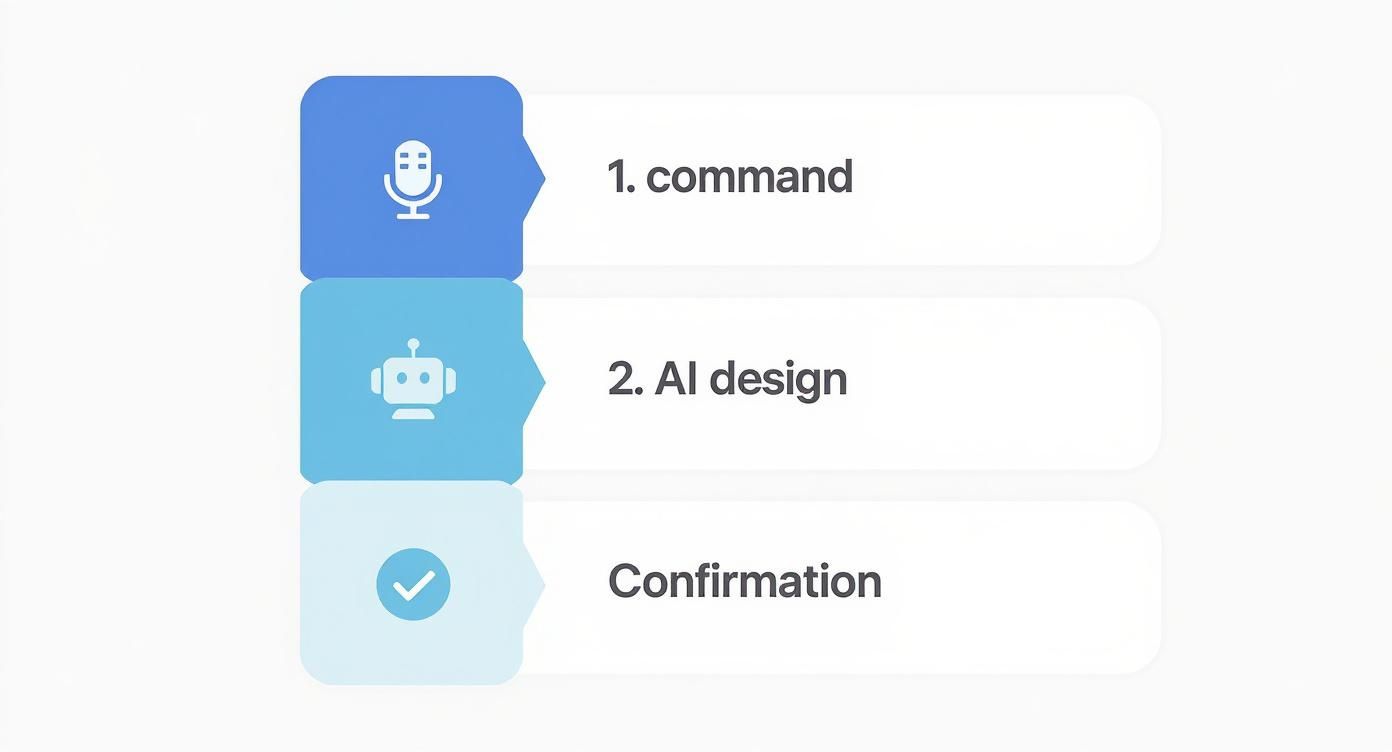
As you can see, the entire administrative effort is reduced to a short instruction and a quick approval. It doesn't get simpler than that.
No More Time Wasters – Even on Complex Tasks
But wait, it gets even better! Your AI assistant also takes truly annoying, complex tasks off your hands – the kind that used to test everyone's patience.
-
Coordinating meeting series with multiple stakeholders: a kickoff meeting with three internal colleagues and two external partners is coming up. Normally a nightmare of Doodle polls and email ping-pong. Your new way: "Find a 90-minute slot next week for Anna, Tom, Lisa, and the external contacts Mr. Wagner and Ms. Huber. Topic is 'Kickoff Project Phoenix.'" The AI immediately checks all calendars and suggests the perfect slot. From 20 minutes for complex scheduling down to a 2-minute voice command.
-
Multilingual communication with international customers: an important customer from France sends a complex inquiry in French. Instead of relying on clunky translator tools, you just have InnoGPT reply: "Answer this email professionally in French. Confirm receipt and announce a detailed offer within 24 hours." That way, you bridge language barriers confidently and at lightning speed.
Think about it: Instead of 15 minutes for a diplomatic decline email – 30 seconds of AI instruction.
These scenarios aren't fiction. They show how you simply tear down administrative hurdles and free up massive amounts of time. Time you can finally put back into what really counts: your customers.
The Efficiency Multiplier in Key Account Management
The following table shows in black and white how dramatically the time required for typical key account manager tasks differs with and without AI support from InnoGPT in Outlook.
| Task | Time Manual (Before) | Time with InnoGPT (After) | Time Saved |
|---|---|---|---|
| Creating personalized invitations | 90 minutes | 5 minutes | 85 minutes |
| Writing a detailed meeting summary | 15 minutes | 2 minutes | 13 minutes |
| Coordinating a meeting with 5 people | 20 minutes | 2 minutes | 18 minutes |
| Replying to a foreign-language email | 10 minutes | 1 minute | 9 minutes |
As you can see, these are no longer small optimizations. We're talking about a real efficiency revolution for your daily work – one that gives you back several hours of valuable time per week.
Why Data Security with Your Outlook AI Is the Be-All and End-All
Think of your new AI assistant as a personal butler who lives right in your inbox. Super handy, right? He sorts your mail, schedules meetings, and even drafts replies. But honestly: would you trust a butler who reads all of your business mail and gossips the details to third parties? Unlikely. That's precisely why data security is decisive when you integrate a Chat for Outlook into your work life.

European Sovereignty Instead of US Data Hunger
The key point is where your data actually ends up and gets processed. Many tools, especially from the US, shovel your entire communication – from confidential draft contracts to internal strategy papers – over to American servers. But over there, completely different, often more lax data protection laws apply. That's a risk many people don't have on their radar.
With a European solution like InnoGPT, the world looks completely different: every voice command, every email, every document – everything is guaranteed to stay in European data centers. That's not just marketing talk, it's rock-solid protection for your most valuable asset: your business secrets. You retain full control and sovereignty over your information.
Your Discreet Butler in Your Digital Inbox
To stick with our butler comparison: InnoGPT is the perfect, absolutely discreet servant. He executes commands, organizes brilliantly, but is committed to one hundred percent confidentiality. In stark contrast, other providers behave more like nosy neighbors who secretly sniff through your mail to see what's new.
While US tools get access to your entire business communication, with InnoGPT everything stays in European data centers.
For any company that has to comply with the GDPR, this focus on data protection is not a nice option – it's an unavoidable necessity. Even major players like Microsoft have recognized how important this is for the German and European markets. They now themselves emphasize that with their AI solutions like Copilot, data processing takes place locally in Europe to create trust.
A look at our privacy policy transparently shows you how we protect your data. It's about ensuring compliance and actively preventing your intellectual property from falling into the wrong hands. If you want to dive even deeper into our security architecture, you'll find all the info on our technical and organizational measures.
End Shadow IT – This Is How Secure Integration Works!
Sound familiar? In countless companies, the same drama plays out day after day: your team urgently needs AI support to handle the flood of tasks and stay competitive. But what happens when there's no official, secure solution? Exactly – people frustratedly reach for external tools like ChatGPT. What starts as a clever trick quickly turns into a genuine nightmare for your IT security.
Suddenly, uncontrolled data outflow begins. Highly sensitive customer data, internal strategy papers, or explosive contract details are thoughtlessly copied into public AI systems. This information leaves your company and lands on foreign servers over which you have no control whatsoever. A gigantic security risk with potentially devastating consequences.
The Smart Move: Act Proactively Instead of Reactively Banning
Issuing bans is usually the worst possible approach here. They only frustrate, slow down productivity, and get circumvented anyway. The truly intelligent solution? Put a tool into your team's hands that's so brilliant and easy to use that no one even thinks about reaching for insecure alternatives. And that's precisely where Chat for Outlook with InnoGPT comes in as the knockdown argument against shadow IT.
InnoGPT is the most powerful argument against shadow IT. You give your employees the AI power they want, and give your IT department full control over company data back. A real win-win!
By offering a powerful, secure, and above all natively-Outlook-integrated AI, you solve this problem once and for all. Your employees no longer have to leave their familiar work environment and can tap the full power of AI without accidentally exposing business secrets.
That turns a massive security risk into a real strategic advantage. Your team works more efficiently and creatively than ever, while you have the reassuring certainty that your most valuable data stays where it belongs: safely in your company. That's the smart way to foster innovation and stay in control at the same time.
All Clear? Your Questions About Chat for Outlook Answered
You think the idea of souping up Outlook with an AI assistant is great, but a few questions are still buzzing around in your head? Perfect! That's exactly what this section is for. We'll clarify the most important points around Chat for Outlook with InnoGPT so you can start with full confidence.
How Does the AI Actually Learn to Write Like Me?
This is one of the best questions of all, because it holds the key to truly authentic emails. InnoGPT looks at your past emails and writing style – but, and this is the decisive point, all of this happens in your own secure and completely isolated environment. The AI learns your typical phrasings, your tone, and your scheduling preferences.
Not a single bit of data leaves that protected zone. Nothing is sent to third-party providers. That way, the drafts the AI suggests don't sound like a robot – they always sound like you. This personalization takes place right with you, which not only preserves your personal touch but also takes data protection to the extreme.
Isn't This Horribly Complicated to Install?
Quite the opposite! We know no one wants to deal with complicated tech setups. That's why we built InnoGPT as a regular add-in for Outlook. The installation is done with a few clicks, and your new assistant is ready.
You don't have to be an IT expert to use this. Operating it by voice command is as easy and intuitive as a short chat with a colleague. You can get started immediately, without first having to wade through thick manuals.
And Where Exactly Does My Data End Up?
We make absolutely no compromises here, and that's the huge advantage of a European solution. From your voice command to the finished email draft, everything – really everything – stays in certified European data centers.
For you and your company, that concretely means:
- 100% GDPR-compliant: you're always on the safe side legally.
- Maximum data sovereignty: you retain full control over your sensitive company data.
- No data outflow to US corporations: your business secrets stay safe in Europe.
With this crystal-clear policy, you can tap the full power of AI and still sleep peacefully, because you know exactly where your data is – perfectly protected.
Ready to revolutionize your daily work in Outlook and finally have more time for what matters? Discover InnoGPT and experience for yourself how easy and secure AI can be. Test us for free now, without obligation! Learn more at https://www.innogpt.de.
Weekly AI news in your inbox
New models, practical tips & expert insights — free for everyone.
Related articles
Zive alternative: innoGPT — workplace AI from Germany
Chat, knowledge base, search and tasks in one platform — bootstrapped, EU-hosted, ISO 27001-aligned.
AI Text Rewriting: How to Reformulate Content GDPR-Compliant Without Endangering Your Data
Learn how to rewrite text with AI while staying GDPR-compliant. Practical tips for secure, efficient, and privacy-compliant content.
Upload PDFs Safely to AI Assistants: GDPR-Compliant Alternative to ChatGPT
Learn how to stay GDPR-compliant when uploading PDFs to ChatGPT. Discover secure alternatives for your company and protect sensitive data.