tl;dr:
- Effective prompting is the key to productive AI usage.
- Concrete techniques and examples show the difference between weak and strong prompts.
- With InnoGPT, companies can train their employees in prompting in a GDPR-compliant way without putting sensitive data at risk.
Why AI Doesn't Deliver What You Need
Imagine walking into a Michelin-starred restaurant and telling the chef: "I'd like something to eat." You'll probably get something – but will it meet your expectations? It's exactly the same with generative AI: the more precise your "order" (your prompt), the more accurately the result will match your needs.
Many people know this frustration: the AI just doesn't seem to understand what you want. But the problem rarely lies in the technology itself – it lies in the quality of your instruction, the so-called prompt. Without a good prompt, even the smartest AI models are like a brilliant chef without a recipe. You can get started with generative AI immediately, even without your own data, but the quality of the result stands or falls with your request.
The Art of Precise Instruction
Many people initially feel unsure whether their prompt is "good enough." The good news: there's no right or wrong – only more effective and less effective. Professional prompting isn't magic, it's a learnable craft. It's about placing your "order" so crystal clearly that the AI can deliver exactly what you have in mind.
You need to articulate your intent clearly and give the AI the necessary context. Picture the AI as a highly intelligent but completely new intern: it can deliver brilliant work, but it needs precise, step-by-step instructions.
The decisive shift in working with AI happens right here: away from vague questions and toward detailed work instructions. That's the moment when a nice toy becomes a real power tool for everyday work.
A bad prompt spits out generic, unusable answers. In the end, you spend more time correcting than you saved. A truly good prompt, on the other hand, delivers tailored results that send your productivity through the roof.
The 5 Fundamental Principles for Powerful Prompts
To really get the most out of an AI, you need to learn its language. That sounds more complicated than it is! If you internalize the following golden rules, your results won't just improve a little – they'll improve dramatically. Promise.
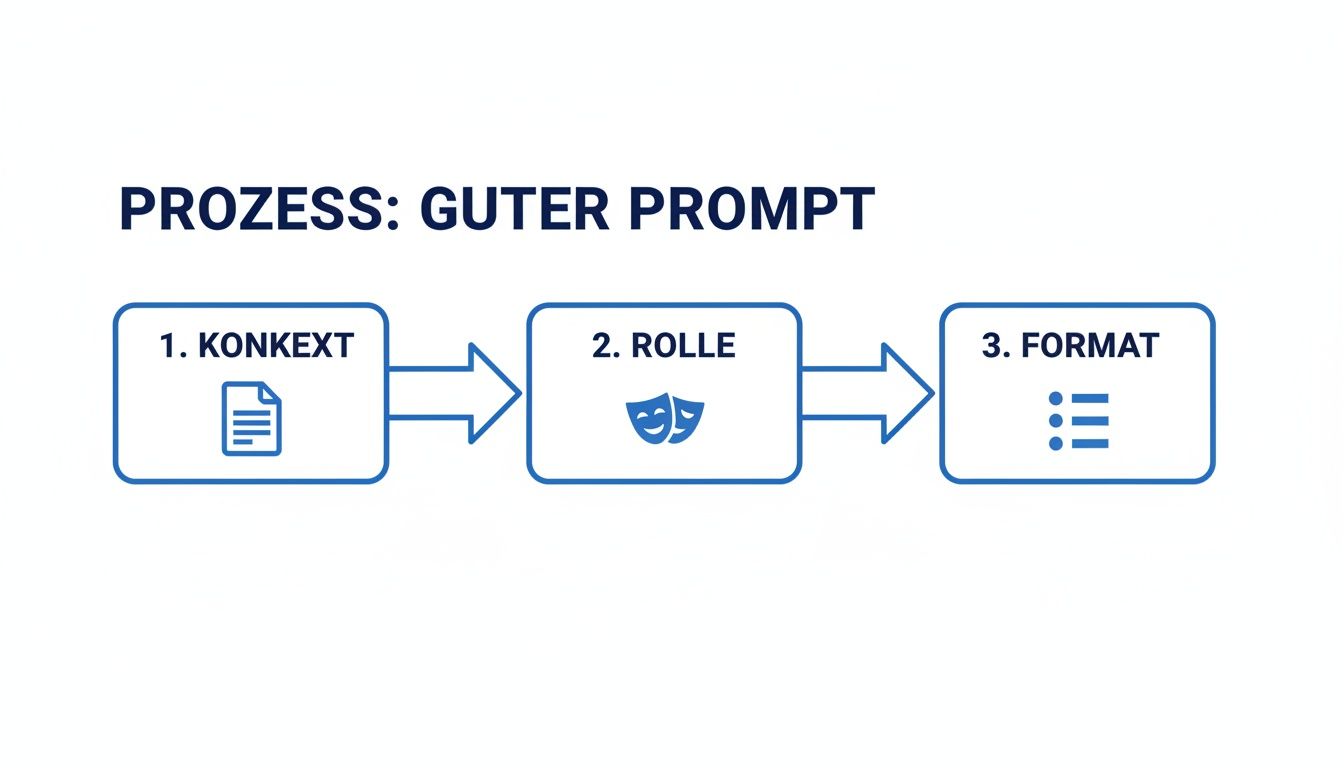
1. Context Is King
Honestly, this is the most important point of all: always give the AI the necessary background. A short command without context is like calling a colleague, barging in without a greeting, and saying: "Send me the info." Which info? For which project? By when? Completely hopeless.
❌ Weak prompt:
Write an email.
✅ Optimized prompt:
Write a formal email to a key account customer regarding a project delay. The tone should be factual yet empathetic, and the email should be a maximum of 150 words.
The difference is like night and day, right? With the right context, the AI knows exactly what to do and delivers a result you can send out almost without any corrections.
2. Define the Role
Imagine being able to hire the perfect expert for any task at the push of a button. That's exactly what you're doing when you assign the AI a role. By giving it a clear persona, you fundamentally change the perspective, style, and expertise of the response.
- For marketing: "You are an experienced social media manager specializing in B2B tech companies."
- For HR: "You are a seasoned employment law expert with 15 years of practical experience at German mid-market companies."
- For sales: "You are an experienced project manager with 15 years of experience..."
This single instruction at the start of your prompt forces the AI to filter its vast knowledge through the lens of that expert. The result? A response that lands professionally and hits exactly the right tone.
3. Specify the Format
You wouldn't shout to a graphic designer, "Make something nice!" without saying whether you need a logo, a social media banner, or an infographic. In the same way, you need to tell the AI precisely what form you want the answer in.
❌ Weak prompt:
Summarize.
✅ Optimized prompt:
Create a bullet-point list with a maximum of 5 points.
A clear specification for the output format is the key to getting results you can work with immediately. Instead of a long block of text you first have to laboriously break apart yourself, you get perfectly prepared, immediately usable information.
4. Refine Iteratively
Many people treat an AI like a search engine: one question, one answer, done. That's a huge mistake! Prompting is a dialogue, not a monologue. The first answer is often just the starting point, not the finished masterpiece.
If the first version isn't 100% right yet, give the AI feedback and get more precise. Simply respond to the result:
- "Great approach, but please phrase it more concisely and directly."
- "Add one more point that highlights the cost benefits crystal-clearly."
- "Change the tone. Make it more casual and motivating!"
This iterative approach, also known as "chain-of-thought," almost always leads to significantly better results and is one of the true superpowers of working with AI.
5. Use Examples (Few-Shot Prompting)
One of the smartest techniques for controlling style and quality is so-called few-shot prompting. Don't worry – the name sounds more complicated than it is. Basically, it just means: give the AI one or two examples of exactly the output you want. You're showing the AI what you want instead of just describing it.
An example for a product description:
Write a short, enthusiastic product description for our new CRM tool 'ConnectFlow.' Mirror the style of the following examples exactly:
Example 1: "SalesBoost – Your turbo for more deals. Intuitive, fast, and always one step ahead." Example 2: "LeadGenius – Turn cold contacts into hot leads. The smart way to prospect."
The AI dissects your examples, analyzes the style and sentence structure, and then applies this pattern to your new request. The result is a response that fits perfectly into your existing brand communication.
From Weak Command to Perfect Prompt: 3 Practical Examples
Okay, enough theory! Now let's get practical. These direct before-and-after comparisons show how a few adjustments can produce massive improvements.
Example 1: Summarize a Meeting Protocol
❌ Weak prompt:
Summarize the meeting minutes.
✅ Optimized prompt:
You are an experienced project manager. Analyze the following minutes from the "Phoenix" project update. Extract the 3 most important decisions (bullet points) and create a table of all action items (task, owner, due by).
➡️ Result: You get an immediately usable, structured overview for stakeholders instead of a generic wall of text. That easily saves you 20 minutes of tedious rework.
Example 2: Customer Communication During a Project Delay
❌ Weak prompt:
Write an email to a customer about a project delay.
✅ Optimized prompt:
Act as an empathetic key account manager. Draft a proactive, understanding email (max. 150 words) to our customer Mr. Schmidt. Transparently inform him about a 2-week delay on the "New Dashboard" project. Justify it with unforeseen technical hurdles and proactively propose a new timeline by Friday.
➡️ Result: A professional, empathetic email draft that strengthens the customer relationship instead of an impersonal standard message that irritates the customer. Looking for even more smart use cases like this? In our article on ChatGPT questions and examples you'll find tons more inspiration.
Example 3: Draft for a Strategy Paper
❌ Weak prompt:
Create a marketing strategy.
✅ Optimized prompt:
You are a B2B marketing consultant. Draft a Q3 marketing strategy for our software company (a project management tool for mid-market companies). Goal: lead generation. Propose 3 campaigns and structure them by content, social media, and performance marketing.
➡️ Result: A tailored, strategic draft with concrete ideas that serves as the perfect basis for discussion – no generic fluff that could have come straight out of a textbook.
How Your Entire Team Becomes a Prompt Master – The Safe Practice Space

Being able to write strong prompts is a true superpower for every individual. But the full potential is only unlocked when the entire team masters AI communication. And this is where most companies stumble over the biggest hurdle of all: data protection.
To get really good, you have to practice with real, relevant data. Using public AI tools for this sets off a data protection time bomb. Every input potentially lands on US servers and is often used directly to train third-party models. This creates a dilemma: either you practice with fictitious, unrealistic data and the learning effect fizzles out, or you risk massive GDPR penalties.
InnoGPT: Your Safe Training Space for Top Results
It's exactly for this challenge that we developed InnoGPT as a secure European solution. Unlike US cloud solutions, your employees can practice with real, sensitive business data on InnoGPT without hesitation – for example actual customer inquiries or internal project reports – because all data remains on European servers in a GDPR-compliant way and is not used to train third-party models.
This is the protected training space where your team can unleash its full potential. Organizational measures for data protection are a central building block. Learn more in our article on how we ensure data protection through organizational measures. This security lays the foundation for real innovation and collaboration.
Ready for the Productivity Boost with InnoGPT?
You've seen it: professional prompting isn't magic, it's a learnable craft. The only way to truly master it is practice. Jump right in and try it out – in the safe environment of InnoGPT.
The decisive advantage: you can work with real, sensitive company data without any worries.
- Sales: Have real customer emails analyzed and create perfect proposal drafts in seconds.
- Marketing: Feed the AI your internal strategy papers to generate brilliant campaign ideas from them.
- HR: Summarize stacks of applications or draft reference letters that match your tone exactly.
That's only possible when you can be 100% sure your data is protected. With InnoGPT, everything stays GDPR-compliant on European servers. Period.
Start Now – Risk-Free
What are you waiting for? Take the techniques from this guide and apply them. With InnoGPT, European companies have the secure environment to master this skill without data protection risks. Try what you've learned immediately – with the confidence that you don't have to expose your sensitive data.
Try InnoGPT free for 7 days, completely risk-free!
FAQ: Your Final Questions About Prompting, Answered
Weekly AI news in your inbox
New models, practical tips & expert insights — free for everyone.
More on: Prompt Engineering
The Ultimate Prompt Library for Generative AI: ChatGPT Prompts in English as PDF
100 ready-to-use prompt templates for 10 business functions — with an explanation of the 5 most important prompt methods. Free PDF download from innoGPT.
Mastering German AI Prompts: The Key to Professional Results
Discover the best sources for a professional ChatGPT prompt in German. Includes templates and tips for marketing, sales, and more. Optimize today!
The Best AI Prompts for Learning: How to Use Generative AI as Your Personal Learning Coach
Discover the best ChatGPT prompts for learning and turn AI into your personal study coach. Maximise your learning results with targeted instructions!
How to Query AI Correctly: Get the Most from Generative AI Assistants
Discover how to query AI safely and effectively to get fast, helpful answers that actually move your business forward.

What Is a Prompt in ChatGPT and How Do You Master It
What is a prompt in ChatGPT? Learn how to squeeze the maximum out of every AI response with clear instructions and the right techniques.

AI Prompts in German: The Guide for Professional Use in Europe
Discover our German AI prompt guide and learn how to write precise prompts and use generative AI safely.